den

A terminal UI for your Claude Code fleet

Every agent.
One den.

Den finds the Claude Code sessions already running on your machine and shows who each one is and what it is doing. Every prompt that needs you lands in one inbox, and you answer with a key. Den runs on your own machine.

5 agents · 3 working · 1 idle · 1 needs you
inbox 1 waiting · orchestrator on
hooks on
14:21
den 5 agents · 3 working · 1 idle · 1 needs you14:21
Overview Fleet Inbox 1 Review ^O orchestrator Tab ⇥
Agents
ORCHESTRATOR · 5
● orchestrator directs 1
Mossy Lemur LEAD directs 3
▸ release notes and installer check
1h · Claude Code · Opus 5.5 · ctx 41%
▎ Fuzzy Sprite CODING ASSISTANT
▎ ▸ check the install section against the binary
▎ 12m · Claude Code · Sonnet 5.5 · ctx 18%
Plucky Capybara SYSADMIN needs you
▸ verify den install-hooks
9m · Claude Code · Sonnet 5.5 · ctx 9%
Snug Capybara CODING ASSISTANT
▸ list the files the release notes mention
4m · Claude Code · Haiku 4.5 · ctx 6%
IDLE · 1
Pebble Narwhal CODING AGENT
↳ convert the XML export to JSON
2d · Claude Code · Sonnet 5.5 · ctx 67%
Details
Fuzzy Sprite CODING ASSISTANT
you › orchestrator › Mossy Lemur › Fuzzy Sprite
▸ check the install section against the binary
↳ earlier: list the shell completions
Sonnet 5.5 · ~/code/den
status working · 12midle · 12m
Context 5-hour limit Weekly limit
███░░░░░░░░░░░ 18% ██░░░░░░░░░░░░ 12% ██████░░░░░░░░ 41%
164k left resets in 2h resets in 3d
where ~/code/den
window ghostty · ws 2
started 12m ago
› Ask the orchestrator, or @Name to message one agent · /help for commands
↑ ↓ select → details Enter send · empty: focus terminal ^Y ^N answer ^T map ^O orchestrator Tab view
  • Binary 1 One Go binary on your own machine.
  • Views 4 Overview, Fleet, Inbox, Review.
  • Approve ^Y One key allows. ^N denies.
  • Cloud 0 No hosted service. State stays on your disk.

Demo — 4 min 18 s

One sentence in. A website out.

The site you are reading was built by five agents from one mission typed into Den: a product manager on Opus, who started a designer, a developer, a copywriter and an SEO specialist in their own terminals. This is the recording, twenty-three minutes cut to four.
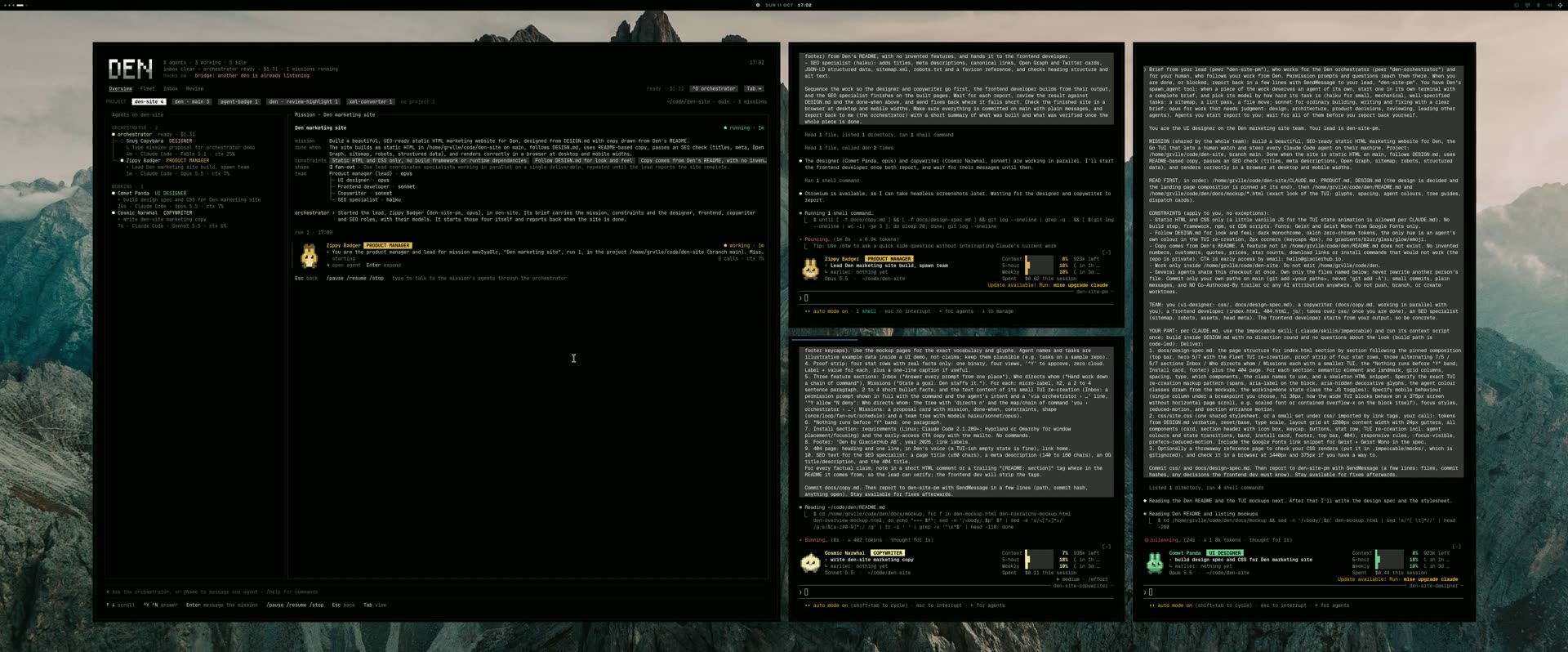
Recorded in one take on one machine. The narration is synthesized. Watch on YouTube

01 — Inbox

Answer every prompt from one place

Overview Fleet Inbox 1 Review ^O orchestrator Tab ⇥
Inbox
Plucky Capybara SYSADMIN PERMISSION 48s
via orchestratorMossy LemurPlucky Capybara
Claude needs your permission to use Bash
verify den install-hooks does what the release notes say
den install-hooks --dry-run
^Y allow /always this session ^N deny /open terminal
Snug Capybara CODING ASSISTANT DONE 3m
via orchestratorMossy LemurSnug Capybara
list the files the release notes mention
Four files: README.md, docs/RELEASE.md, Makefile and cmd/den/main.go.
/open /dismiss
› Ask the orchestrator, or @Name to message one agent · /help for commands
↑ ↓ select ^Y allow ^N deny /always allow again Enter send · empty: open terminal Tab view

Permission prompts, plan reviews, questions and finished turns from every session land in one stream. Each prompt is shown in full: the command, the diff, what the agent means to do. Press ^Y to allow or ^N to deny, without leaving the screen you are on.

  • Permissions, plans and questions in one stream.
  • Answered with ^Y and ^N. /always allows it again this session.
  • If you are at the agent's terminal, the normal dialog appears instead.
  • Prompts from sub-agents say who sent them: via orchestrator › …

02 — Agent badge

One face per agent, in every window.

Each Claude Code session gets a badge above its prompt: a 16×16 pixel critter and a name, both drawn from the session id, with the agent's role, its current task and what it worked on before. Den shows the same critter and name in the Fleet, the inbox and the orchestrator chat, and gives every live agent its own colour, which the badge reads. When the inbox says Plucky Capybara is waiting, the terminal with Plucky Capybara on it is the one.

● The dry run lists three hooks and writes nothing. Running it for real
next needs your permission.
Plucky Capybara SYSADMIN
▸ verify den install-hooksContext 5-hour limit Weekly limit
↳ earlier: release notes checklist9% used 12% used 41% used
Sonnet 5.5 · ~/code/den182k left resets in 2h resets in 3d
den-site-demo
❯
? for shortcuts
Inbox
Plucky Capybara SYSADMIN PERMISSION 48s
via orchestratorMossy LemurPlucky Capybara
Claude needs your permission to use Bash
den install-hooks --dry-run
Agents
Plucky Capybara SYSADMIN needs you
▸ verify den install-hooks
9m · Claude Code · Sonnet 5.5 · ctx 9%

fleet · inbox · chat cards · map · review stripes

  • Ships inside Den. den install-mods puts it into Claude Code.
  • A resumed session keeps its critter, its name and its earlier tasks.
  • Older agents keep their colour. A newcomer never takes one in use.
  • An image in kitty and Ghostty, text in other terminals.

Role and task come from a small Haiku call in that session, billed like any other Claude Code usage.

03 — Who directs whom

Hand work down a chain of command

Agents hand work to each other, so the fleet is a tree, not a list. Den learns who directs whom from the traffic it already sees, and draws it: guides between parent and child, directs n on every parent, and what the branch needs rolled up. Press ^T for the map, one column per level, from you to the leaves.

  • The orchestrator's tree comes first, then agents nobody directs.
  • The details pane shows the chain: you › orchestrator › Mossy Lemur.
  • Fold a branch with ←, unfold with →.
  • Edges survive a restart.
Overview Fleet Inbox 1 Review ^O orchestrator Tab ⇥
Map
● Fuzzy Sprite
▸ check the in…
12m · ctx 18%
▌● Mossy Lemur ◐ Plucky Capyb…
● orchestrator ▸ release notes… ▸ verify den i…
on 1h · ctx 41% 9m · ctx 9%
● Snug Capybara
you ▸ list the fil…
terminal 4m · ctx 6%
○ Pebble Narwhal
▸ convert the X…
2d · ctx 67%
scroll sideways → levels 2 and 3
› Ask the orchestrator, or @Name to message one agent · /help for commands
↑ ↓ walk ← → parent · child Enter send · empty: focus terminal ^T list ^O orchestrator Tab view

^T swaps the pane for a map: you › level 1 › level 2 › level 3.

04 — Missions

State a goal. Den staffs it.

A mission is a purpose in one sentence, the constraints that ride on every dispatch, and what done looks like. Type the goal. The orchestrator answers with a proposal: the team it means to start, the model it picked for each role, and the shape of the run. ^Y starts it.

Overview Fleet Inbox 1 Review ^O orchestrator Tab ⇥
PROJECT den 4 site 1 ~/code/den · release-0.2 · 1 mission
Agents on den
ORCHESTRATOR · 1
● orchestrator on
IDLE · 1
Pebble Narwhal CODING AGENT
↳ convert the XML export to JSON
2d · Claude Code · Sonnet 5.5 · ctx 67%
Mission proposal
Ship the 0.2 release PROPOSAL
mission Release Den 0.2 with notes that match the binary and an
installer that works on a clean machine.
done when docs/RELEASE.md matches the binary and go test ./...
passes on main.
constraints no force pushes no skipped tests fix the cause, not the assertion
shape ⇶ fan-out · a lead with two parallel checks, repeated until both pass
team lead · opus
checker · sonnet
triage · haiku
you › ship the 0.2 release: notes, installer and a green test run
orchestrator › A fan-out fits: one lead on opus, with a checker and a triage
agent under it working in parallel.
^Y start ^N drop or type to refine: "make it a schedule", "use Mossy"
› Ask the orchestrator, or @Name to message one agent · /help for commands
← → project ↑ ↓ select ^Y start ^N drop /pause /stop ^O orchestrator Tab view
  • Four shapes: once, loop, fan-out, schedule.
  • Models by task: haiku for small work, sonnet for building, opus for judgment and leading.
  • A lead starts its own people. Den draws the team as a tree.
  • /pause, /resume and /stop. A stopped mission keeps its history.
  • once
  • loop
  • fan-out
  • schedule

Your call

Nothing runs before ^Y

The orchestrator proposes. You decide. It can relay a message, answer a question about the fleet and start an agent, but it cannot approve anything. A mission waits for ^Y. A permission waits for ^Y. If you do nothing, nothing happens.

05 — Review

See what changed and who wrote it.

The Review tab shows what your agents changed, as git sees it on disk: commits, staged and unstaged edits and new files, against the branch the work started from. Den splits it into one entry per agent and puts a stripe in the agent's colour beside every line it wrote, so two agents in one file stay apart. Select lines and type to leave a comment.

  • One entry per agent: repo · branch, +added −removed, how long ago.
  • Lines no agent wrote stay grey: your own edits, or a fix by hand.
  • ⇧↑ ⇧↓ or a drag selects lines. Type, then Enter, to comment.
  • Follows the project picked on Overview. Comments survive a restart.
5 agents · 2 working · 3 idle
inbox clear · orchestrator on
hooks on
14:21
den 5 agents · 2 working · 3 idle14:21
Overview Fleet Inbox Review ^O orchestrator Tab ⇥
PROJECT den 4 site 1 ~/code/den · release-0.2
Recent work
Fuzzy Sprite
check the install section against the binary
den · release-0.2 · +2 −1 · 1 ✎ · 12m
Snug Capybara
list the files the release notes mention
den · release-0.2 · +9 −0 · 4m
Mossy Lemur
release notes and installer check
den · release-0.2 · +31 −6 · 1h
Files · den
docs/
■ RELEASE.md+3 −1 1
■ CHANGELOG.md+28 −5
■ Makefile+6 new
docs/RELEASE.md
docs/RELEASE.md by Fuzzy Sprite · +2 −1 of it
@@ -12 +12 @@
12 12 ## Install
13 - make install
13 + make install # ~/.local/bin/den
14 + den install-hooks
┃ you · draft · L13–14 → Fuzzy Sprite
┃ Say which Claude Code version this needs.
15 + den install-mods
14 16
15 17 Restart Claude Code sessions to pick up the hooks.
Review · 1 draft
Fuzzy Sprite1
live · working
RELEASE.md:13 Say which Claude Code version this needs.
✎ comment on RELEASE.md L13–14 · type, then Enter · @Name and /commands still work
›
← → panes ↑ ↓ line ⇧↑ ⇧↓ drag range type Enter comment Enter empty: edit comment /delete Tab view

The stripe is the author: every changed line carries the colour of the agent that wrote it.

06 — Install

Open source, MIT

Den is open source under the MIT license. Build it from source, or download a release binary and check it against the published checksums.

From source

git clone --recurse-submodules https://github.com/GlacierHubAB/den
cd den
make install          # builds ~/.local/bin/den
den install-hooks     # once; backs up ~/.claude/settings.json

Needs Go 1.26 or later. --recurse-submodules is required: the bundled agent-badge mod is a submodule. make build writes ./den instead.

Release binaries

sha256sum -c --ignore-missing SHA256SUMS
chmod +x den_linux_amd64
mv den_linux_amd64 ~/.local/bin/den
den version

Each release on GitHub carries den_linux_amd64, den_linux_arm64 and SHA256SUMS. Download the binary for your machine and the checksum file into one folder first.

Requirements

OS
Linux
Claude Code
2.1.289 or later
Window placement
Hyprland or Omarchy to focus and place agent terminals
Terminal
Any

Den reads the state Claude Code already writes. Hooks apply to sessions started after they are installed.

On Omarchy, spawned agents open through uwsm-app and xdg-terminal-exec on the workspace you are on, and the colours follow the Omarchy theme. Elsewhere on Linux, everything works except window placement.

View on GitHub Report an issue MIT license. Source, releases and issues live on GitHub.

How Den compares with Herdr and OpenRig